
ecomixOne — Full-Stack E-Commerce Platform
One store, five kinds of user
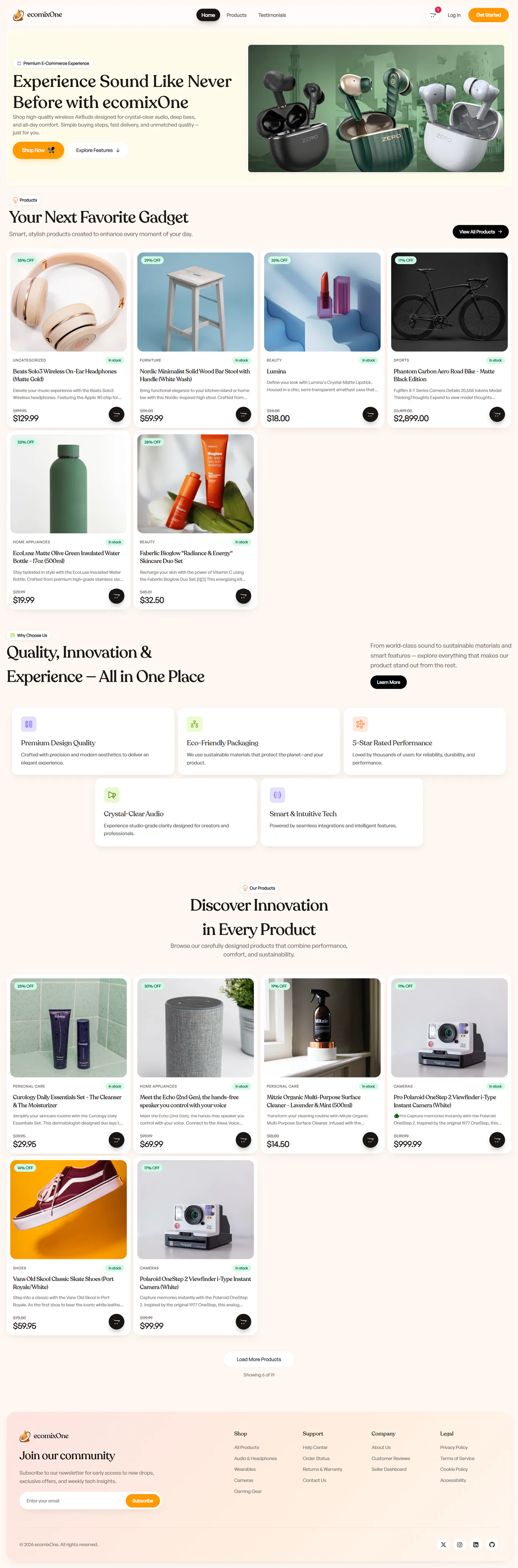
ecomixOne is an online store for audio and tech gear. Shoppers see a clean storefront, but behind it sit sellers who manage products, staff who manage people and an admin who runs the whole site. The job was to give each of them the tools they need, and only those tools, without building five separate apps.
- Type
- E-commerce platform
- Role
- Full-stack development & UI
- Core stack
- Next.js 15 · React 19 · TypeScript · Tailwind CSS v4
- Focus
- Roles & access, checkout, dashboards
The problem
A shop is easy to picture from the shopper’s side: browse, add to cart, pay. The hard part is everyone else. Sellers need to add products and handle orders. Staff need to see users. An admin needs to change roles and site settings. Each of those people should see their own tools and nothing more.
Payments add a second problem. A card payment can succeed after the shopper has closed the tab, so the order and the stock count cannot depend on the browser reporting back.
What I built
A Next.js 15 App Router app in React 19 and TypeScript, styled with Tailwind CSS v4. Clerk handles sign-in, Stripe handles payments, Firebase Firestore stores products and orders, and UploadThing stores product images. It is deployed on Vercel.
Storefront: a home page, a product catalogue, a page for every product with reviews, testimonials, an FAQ and legal pages.
Cart and checkout: a slide-out cart built with Zustand that is saved between visits, and a Stripe checkout for signed-in shoppers.
Five dashboards: customer, seller, moderator, manager and admin, each with its own layout, sidebar and header, built from one shared set of dashboard components.
Seller tools: add and edit products with image uploads and tags, process orders, and follow sales with Recharts charts.
Admin panel: change user roles, invite members, post site-wide announcements, turn on maintenance mode and read the audit log.
Sign-in: custom Clerk sign-in and sign-up forms with Google and email codes, plus a custom account page.
The technical decisions, and why
One list decides who can open each dashboard
Every dashboard is listed once in a single file, with its path and the rule for who may enter. The middleware that protects routes, the guards on each dashboard layout and the account menu all read that same list. Adding a dashboard means adding one entry, and the menu can never show a link that the middleware would then block.
Selling is a separate permission, not a rank
Staff roles go up in order: user, moderator, manager, admin, and each one can open every dashboard below its own. Seller sits outside that ladder. If it were a step on it, a moderator would get control of products and orders just by being promoted. Keeping it separate means only sellers, managers and admins can touch the shop’s stock.
Blocked users land somewhere useful
When someone opens a dashboard they are not allowed into, the middleware sends them to the highest dashboard they can use, not to a fixed page. A manager who follows an old link to the admin panel ends up on the manager dashboard instead of an error or a page they cannot use.
Stripe’s webhook confirms the order, not the browser
Before payment starts, the server saves the order as waiting for payment. The order is only marked paid when Stripe’s signed webhook says the payment went through. The stock update and the status change happen together in one Firestore transaction, and an order that is already paid is skipped, so a repeated webhook cannot take stock off twice.
An audit log that never gets in the way
Admin actions such as role changes are written to an audit log with who did it, when and from where. If writing the log fails, the error is recorded but the action itself still goes through. A broken log should not stop an admin from doing their job.
Where it landed
The store works for all five kinds of user from one codebase. Shoppers get a simple storefront and checkout, and each role behind it gets its own dashboard with the tools that role needs.
The main lesson is to decide access in one place. With one list of dashboards and one set of role rules, the routes, the layouts and the menus all agree, and adding a new role later is a small change instead of a search through the whole app.
Built with
Related work
Fern — Administrative Dashboard
Building a Next.js + TypeScript admin dashboard: revenue analytics, order tracking and inventory, and the server/client rendering decisions behind it.
Auth Token Flow — Full-Stack JWT Authentication
A React, Express and MongoDB app showing JWT auth from start to finish: validated signup, bcrypt hashing, protected routes and sessions that survive a reload.