
Evro AI — B2B SaaS Landing Page
Selling an AI coach to people who distrust AI
Evro is an AI coach that helps employees work together better and shows HR teams whether it is working. The buyers are HR and operations leaders who have already seen plenty of AI tools. The site had to explain why this one is different in a few scrolls, then send them to an early-access form.
- Type
- B2B SaaS marketing site
- Role
- Front-end development
- Core stack
- React 19 · TypeScript · Vite · Tailwind CSS v4
- Focus
- Messaging order, scroll polish, clean content
The problem
Evro sells to HR and operations leaders at companies with 100 to 1,000 staff. By the time they reach the page they have heard that AI will fix everything, so a claim like "AI coaching" on its own means nothing to them. The page has to name what goes wrong with ordinary AI first, then show how Evro is different.
The design is loud: huge condensed headings and sections that switch hard between near-white and black. That look only works if everything moving with you stays in step, above all the fixed header, which would otherwise be a white bar sitting on top of a black section.
What I built
A single-page React 19 app in TypeScript, built with Vite and styled with Tailwind CSS v4. React Router serves the home page plus privacy and terms pages, Swiper runs the slider, and AOS adds the scroll-in animations. It is deployed on Vercel.
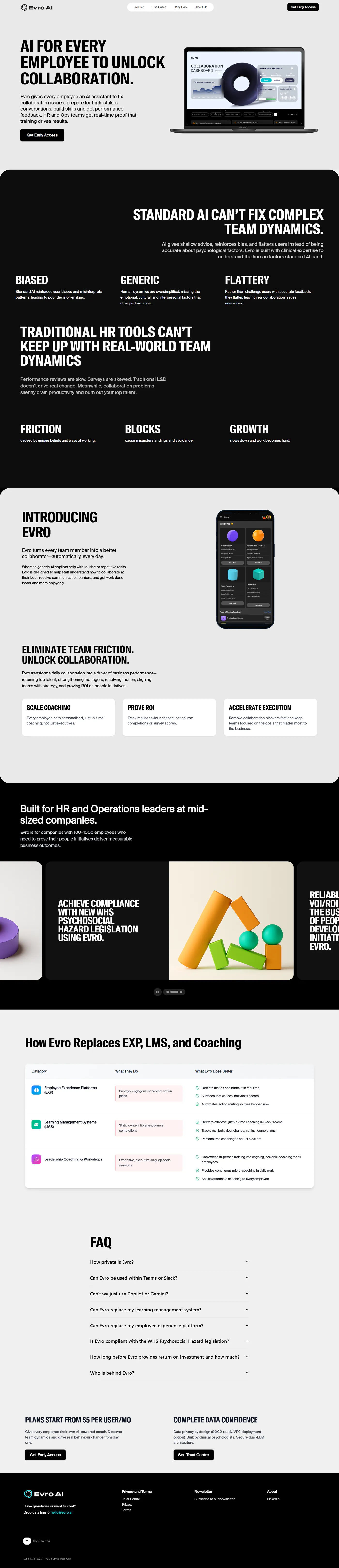
The story in order: a hero, three ways standard AI goes wrong (biased, generic, flattering), the cost of team friction, then Evro as the answer.
Use-case slider: three autoplaying slides for managers, safety compliance and ROI, with a progress bar and a pause button.
Comparison table: what employee experience platforms, learning systems and coaching workshops do, next to what Evro does better.
FAQ and pricing: answers about privacy, Slack and Teams, Copilot and compliance, followed by pricing and a link to the trust centre.
Legal pages: privacy and terms pages that share one document layout.
Mobile menu: a full-screen menu that stops the page behind it from scrolling while it is open.
The technical decisions, and why
The header takes its colour from the page
The header watches the main sections with one IntersectionObserver. When a section is at least a quarter on screen, the header reads that section’s actual background colour from the browser and uses it. A small brightness check then decides whether the logo, links and button should be light or dark. Nothing is hard-coded per section, so a colour change in one section’s CSS can never leave the header out of step.
The slider can be paused
Autoplay is fine for a quick look, but not for someone still reading a slide. The slider keeps running after a swipe, so a visitor does not stop it by accident, and the pause button stops it on purpose. The active dot fills up as the next slide gets closer, so the visitor can see when the slide will change.
Copy lives in data files, not components
Every heading, list, slide, comparison row and FAQ answer sits in typed data files, and the components only lay it out. Rewording a claim or adding a question is a change to one file, and TypeScript catches a slide with no image or a comparison row with a missing column before it ships.
A few small libraries, not a big one
The page is mostly static with a little motion, so it did not need a meta-framework or a heavy animation library. It uses Vite, Swiper for the one slider and AOS for the reveal animations. Everything else is plain React and Tailwind, which keeps the bundle small and the code easy to follow.
Where it landed
The finished page tells the story in a clear order: what is wrong with standard AI, why HR tools fall short, what Evro does and who it is for, how it compares, and what it costs. Each section ends close to a "Get Early Access" button.
The main lesson is to take styling from what the browser actually shows instead of keeping a second copy of it in JavaScript. Because the header reads the real section colour, the design can change without anyone having to update a colour table as well.
Built with
Related work
Conversion-Focused Landing Page
A conversion-focused landing page in React, Tailwind and GSAP — structuring the page around objections, and the technical SEO built in at build time.
Arbiris — Deterministic Agentic Intent Infrastructure
A Next.js and Sanity CMS platform for agentic infrastructure — explaining hardware-rooted cryptographic proof to an audience that checks the claims.