
Neuro Noir — AI Image Generator
A React practice build: an AI image generator with no backend
Neuro Noir is a practice project I built to learn how far a front end can go on its own. It turns a text prompt into an image through the free Pollinations.ai API, keeps every creation in the browser, and wraps it all in a dark, neon interface with script lettering and glass panels.
- Type
- Practice project · web app
- Role
- Design & front-end build
- Core stack
- React 19 · Vite · Bootstrap 5 · React Router · Chart.js
- Focus
- API-driven UI, Local Storage, hooks
The problem
Image generation usually means GPU servers, accounts and API keys. I wanted to see how much of that a static site could skip, and to practise building a real app flow in React: input, loading state, results, saving and deleting.
The project started as a plain HTML site. Moving it to React meant splitting it into components and hooks while keeping the old URLs and saved data working.
What I built
A single-page React app built with Vite, styled with Bootstrap 5 and component CSS, routed with React Router and deployed on Vercel.
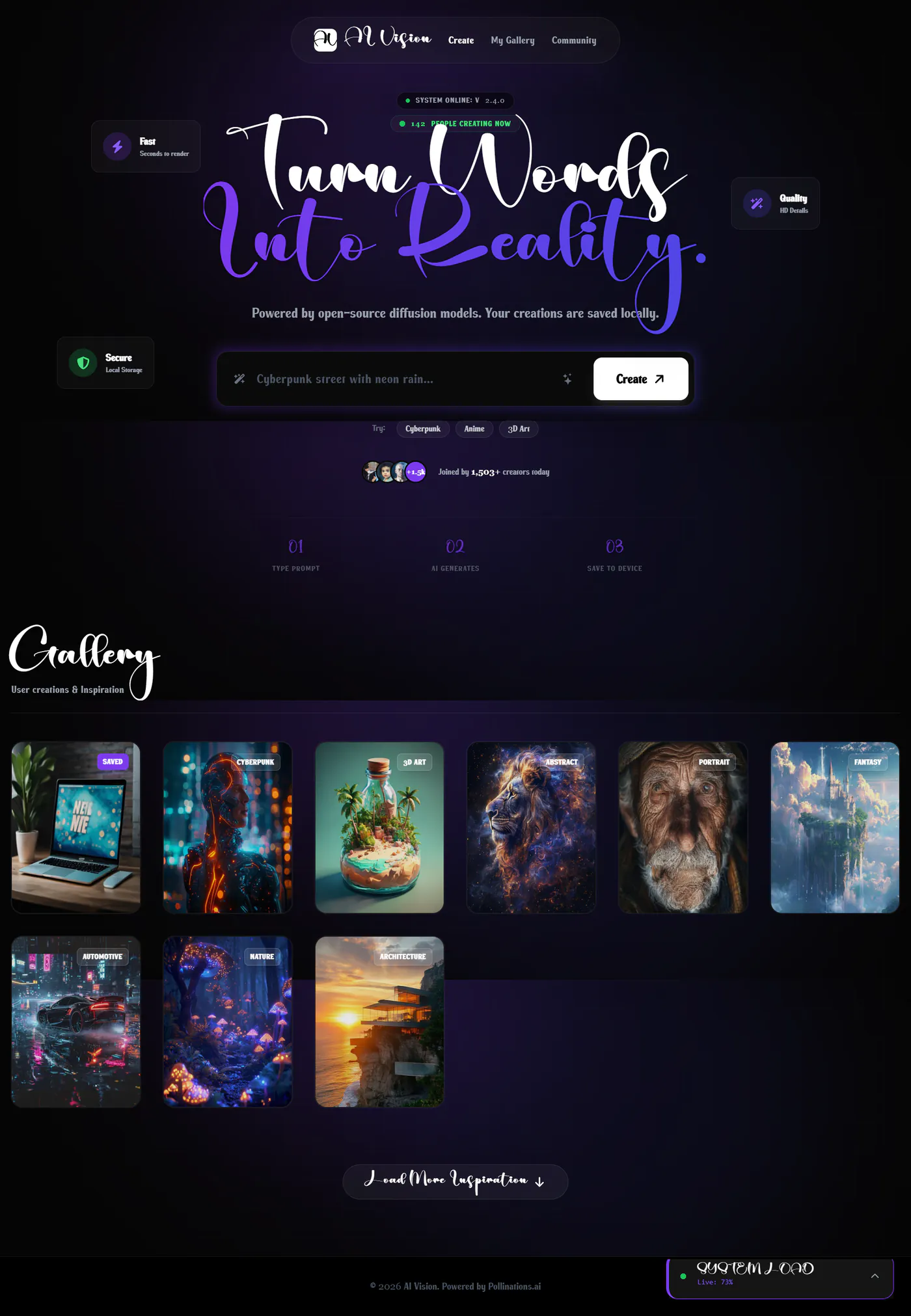
Create page: a “Turn Words Into Reality” hero in script lettering, floating Fast, Quality and Secure cards, and a glowing prompt box with a Create button.
Prompt helpers: style chips for Cyberpunk, Anime and 3D Art, and a one-click enhancer that adds a style such as “cinematic lighting” to the prompt.
Gallery: your saved creations shown first, then an inspiration library that loads in batches with staggered fade-ins. Each card has a loading spinner, and a retry button if the image fails.
Preview and download: a full-screen modal that downloads the image as a file, and opens it in a new tab if the download fails.
My Gallery and Community pages, a cookie consent popup, toast messages, and a “System Load” widget with a live Chart.js line chart that can be minimised.
The technical decisions, and why
The image URL is the generator
Pollinations renders an image the first time its URL is requested, so a creation is stored as just a prompt and a random seed. The same prompt and seed always rebuild the same URL, which keeps saved data tiny and lets the gallery redraw every image after a reload.
Storage behind small hooks
Creations live in Local Storage through a useCreations hook, and the last prompt survives a reload through a cookie in usePersistedPrompt. The storage keys and cookie names match the original HTML site, so people who used it before kept their images after the move to React.
Old links still work
The first version had pages like gallery.html. React Router now redirects each of those paths to its new route, and vercel.json sends unknown paths to index.html so the client-side routes load directly.
Where it landed
The app is live and generates real images from any prompt. It is a practice build: the “people creating now” count, the creator numbers and the system load chart are decorative, and the pricing page is not linked from the menu.
The main lesson was how much state a front end can own. With the right data shape, a prompt and a seed, there was nothing that needed a server at all.
Built with
Related work
Motifly — Browser Image Compressor & Cropper
Motifly — free image compression and cropping built in Next.js that runs entirely in the browser, so photos are never uploaded to a server.
Luma — Digital Marketing Agency Landing Page
A Vue 3, TypeScript and Tailwind CSS practice project: a neon landing page for a digital marketing agency, with generated SVG graphics, Swiper sliders and a reusable button component.